Accounts
The Accounts tab allows you to choose the type of storage system that IceWarp Server will use to store accounts and domains information.
The size of your installation (number of accounts and domains) determines which system you should use.
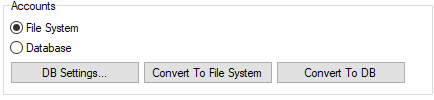
Figure. Storage management: Accounts tab.
|
Field |
Description |
|---|---|
|
File System |
Uses the operating system standard binary files, stored on your hard drive(s). Suitable for installations up to 500 accounts (depending on load). |
|
Database |
Uses a database storage system for account and domain information system. As databases use indexing features, this can significantly increase the speed of account and domain information retrieval. Recommended for installations with over 500 accounts (less if load is high). Note: For very large installations we recommend to use a heavy-duty database application rather than something like SQLite, and run the database system on a dedicated server. |
|
DB Settings |
Use this button to open the Database dialog where you can specify connection information. See Database Settings for more details. |
|
Convert to File System |
If you are using an ODBC system and wish to revert to a file system, use this button first to convert the information, then select the file system you wish to use. |
|
Convert to DB |
If you are using a file system and are changing to a database system you will need to use this button, after you have set up your Database Settings, to migrate your information into the database. |

